Spurbets Login in Kenya
The Spurbets login form asks for two things: a Safaricom number and a password. No email, no username, no code from an app. It is quick on a good day. On a bad day, a lost SIM card or a finished bundle can lock a player out right before kick-off. Here is how to log in on any phone in seconds and how to get back in fast when something goes wrong.
01Spurbets Login Details for Kenyan Players
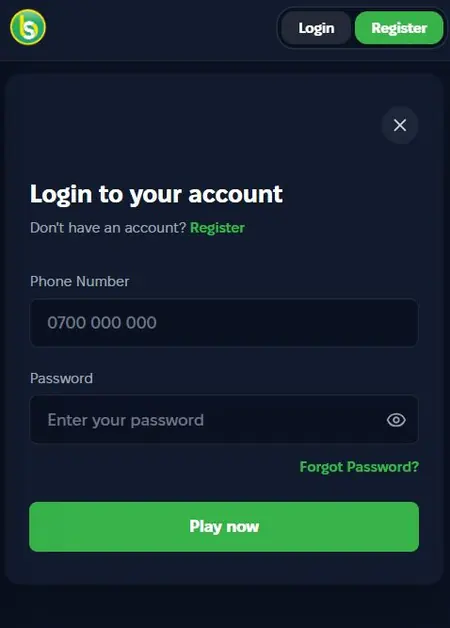
To log in to Spurbets, a player needs the Safaricom number used at registration and the account password. That is all.
| Login detail | What it is |
|---|---|
| Phone number | The Safaricom number from sign-up, format 0700 000 000 |
| Password | The password set during registration |
| Not used | |
| Username | Not used |
| Devices | Android app, mobile website, desktop site |
The Safaricom number does more than open the account. Spurbets also sends M-Pesa withdrawals to it. When the login works, the payouts are pointed at the right number too.
02Spurbets Login in Three Steps
The Spurbets login takes three steps. Enter the Safaricom number, enter the password and tap Play now. The form opens from the Login button in the top right corner of every page.
The window is titled "Login to your account". It opens on top of the page, so a player can log in straight from the Aviator lobby or the football odds.
- 1Enter the Safaricom number
- 2Enter the password
- 3Tap the green Play now button
Your Safaricom Number in the Format 0700 000 000
The first field takes the Safaricom number. The grey placeholder shows the format: 0700 000 000.
- Tap the Phone Number field.
- Type the number starting with 0, for example 0712 345 678.
- Make sure there is no space at the end.
It must be the same number used at sign-up. A different line, even one that belongs to the same player, opens a different account or none at all.
Your Account Password
The second field takes the password. An eye icon sits on the right edge of the field. One tap shows the characters, so the player can catch a capital letter the phone keyboard added by itself.
| Element | Where it is | What it does |
|---|---|---|
| Password field | Second field | Takes the password |
| Eye icon | Right side of the field | Shows or hides the characters |
| Forgot Password | Green link under the field | Starts a reset |
The password should be different from the M-Pesa PIN. That keeps the betting account and the mobile money separate.
Play Now Button for Account Entry
The green Play now button finishes the login. The window closes, and the account opens with the balance in the header.

From there, the player can open the wallet, check the Promotions page or go straight to Aviator. New players can tap "Don't have an account? Register" under the form title to sign up instead. A new account comes with the free KSh 20 stake.
03Spurbets Login on Your Phone
On a phone, players log in through the Spurbets Android app or the mobile website. The details are the same everywhere.
| Phone | How to log in |
|---|---|
| Tecno, Infinix, Samsung, Itel and other Android phones | Spurbets APK app or Chrome |
| iPhone | Mobile website in Safari |
| Laptop or desktop | spurbets.com in any browser |
The Android app comes as an APK from the Download App button on spurbets.com. An APK (Android Package Kit) is the installation file for Android apps outside Google Play. Once installed, the Spurbets icon opens the lobby in one tap. iPhone users can do the same with a home screen shortcut: Share, then Add to Home Screen in Safari.
The balance, bonuses and bet history stay the same on every device. A player can bet on the phone during the match and check the result on a laptop later.
04Your Password Recovery on Spurbets
A forgotten password is a quick fix. Tap the green Forgot Password link under the Password field. The reset runs through the registered Safaricom number.
- Open the login form.
- Tap Forgot Password.
- Enter the registered Safaricom number.
- Follow the instructions on screen.
- Set a new password and log in.
The balance and bonuses stay exactly the same after a reset. A good new password has at least 8 characters, mixes letters and digits, and is different from the M-Pesa PIN.
05Spurbets Login Problems and Solutions
Most login hiccups on Spurbets have one of four causes. It is usually a typo, a different number, a lost SIM or a finished bundle. Each one has a clear fix.
| Problem | Quick fix |
|---|---|
| Details rejected | Check the number and use the eye icon |
| Account not found | Use the number from sign-up |
| Lost or replaced SIM | Restore the same number at Safaricom |
| Form stuck after Play now | Top up the bundle or switch to Wi-Fi |
Incorrect Phone Number or Password
When Spurbets rejects the details, the cause is usually one wrong character.
- Check that the number starts with 0 and matches the sign-up number.
- Tap the eye icon to look for capital letters and spaces.
- Retype the password slowly.
- Use Forgot Password if it still does not work.
Phone Number Without a Spurbets Account
If a number has no Spurbets account, the login will not go through. This often happens when a player carries two SIM cards and tries the wrong one.
The fix is to try the other Safaricom line. If none of the numbers works, the player can tap Register and open a new account. It comes with the KSh 20 free stake.
Lost or Replaced Safaricom SIM Card
If the SIM card is lost or damaged, the player should restore the same number at a Safaricom shop. A replacement SIM keeps the same number, so the Spurbets login keeps working.
- Visit a Safaricom shop with your national ID.
- Ask for a SIM replacement on the same number.
- Insert the new SIM and check that M-Pesa works.
- Log in to Spurbets with the usual number and password.
If the number cannot be restored, Spurbets customer care can help at 0720006699. A player should also stay alert for SIM swap fraud. Anyone who calls asking for a PIN or password is not from Spurbets or Safaricom.
Expired Data Bundle During Login
If the form freezes after Play now, the bundle may have run out or the signal may be weak.
- Check the bundle balance.
- Buy a new bundle or connect to Wi-Fi.
- Reload the page or reopen the app.
- Enter the details again and tap Play now.
The login itself uses very little data. A small daily bundle is enough to log in and place football bets.
06Spurbets Customer Care
Spurbets customer care is open 24/7 by phone, by email and through Live Support on the website. Players can call a local Kenyan number at any hour.
| Channel | Contact |
|---|---|
| Phone | 0720006699 |
| [email protected] | |
| Website | Live Support in the left menu |
When reaching out about login, players should share the registered Safaricom number and what happens after Play now. Customer care never asks for the password or the M-Pesa PIN. Keep both private.
07Frequently Asked Questions
Which Details Do I Need for Spurbets Login?
Just your registered Safaricom number and your password.
Can I Log In With an Airtel Number?
You log in with the number you registered with. Spurbets accounts use numbers with M-Pesa support, so that is your Safaricom line.
Is the Login the Same in the App and on the Website?
Yes. The Android app, the mobile website and the desktop site all use the same details.
How Do I Reset My Spurbets Password?
Tap Forgot Password under the Password field and enter your registered number. Then follow the steps to set a new password.
What Should I Do If I Lose My Safaricom Line?
Get a replacement SIM on the same number at a Safaricom shop, then log in as usual. If that is not possible, call customer care at 0720006699.
Can I Log In on Two Phones?
Yes. You can use the same details on any phone or computer, and your balance is the same on all of them.